
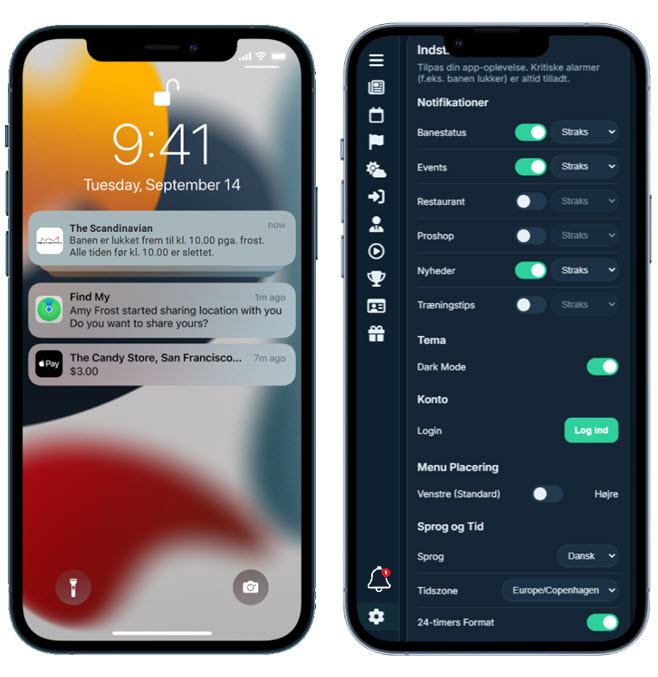
The course is closed after rain. A competition start has moved by 30 minutes. Lightning has stopped play. These are good reasons to interrupt a golfer.
The chef’s new Friday menu, the latest committee minutes and a reminder that the club shop closes at five may all be useful information. That does not make them good reasons to make a phone buzz.
Push is not a small version of email. Email waits in an inbox; a notification appears on a lock screen, sounds or reaches a watch. The member has lent the club attention.
The operational question is therefore not, "What would we like to announce?" It is, "What deserves an interruption?"
Permission is only the first gate
On Android 13 and later, notifications for a new app are off until the app requests permission and the user allows it. Android’s guidance recommends asking in context, after the benefit is clear.
Apple’s App Review Guidelines say push must not be required for an app to function or carry sensitive information. Promotions and direct marketing require explicit in-app opt-in and an in-app opt-out.
The golfer may welcome a course-closure alert but not restaurant promotions. "Allow notifications" is a technical gate, not a permanent vote for every message type.
Put every message into one of four groups
Before discussing frequency, separate the purposes. Four categories are enough for most clubs.
| Category | Examples | Normal treatment |
|---|---|---|
| Immediate operational or safety | Course closed, lightning suspension, evacuation instruction | Push to the affected audience, with a reliable fallback for critical information |
| Personal and time-sensitive service | Tee time changed, wait-list place available, check-in issue | Target only the relevant golfer and reveal no sensitive detail on the lock screen |
| Routine useful information | Weekly course update, competition results, maintenance plan | Usually an in-app item, website update or digest; push only where the member chose it |
| Promotion | Restaurant offer, shop sale, sponsor message | Separate marketing preference and the appropriate consent or lawful route for the jurisdiction |
A message does not become operational because the club wants a quick response. "Book the captain’s dinner before Friday" remains event promotion. "The bridge on the 7th is closed; use the signed route" is operational. The distinction follows the member’s situation, not the sender’s enthusiasm.
Use an interruption test
Every proposed notification should pass six questions:
- Why now? What becomes worse if the member sees it later?
- Who is affected? Can the audience be narrowed by course, competition, booking or language?
- What action is needed? Is there one clear next step?
- How long is it useful? Will the message be stale in an hour, a day or a week?
- Is push the right channel? Would an app banner, website notice, email or weekly digest do the job?
- Who owns the accuracy? Is one named person responsible for approving, correcting and cancelling it?
If the only answer to "Why now?" is "because the text is ready", do not use push.
Local expectations still differ. A member-owned club may welcome a weekly greenkeeping note, while a resort visitor may care only about today’s booking. Competition changes may come from a national platform in one market and the club in another. The category can stay consistent while the channel differs.
Ask for preferences, not blind trust
A permission prompt is clearer after the golfer can see the value:
Receive course-closure and tee-time alerts. Choose separately whether you also want event and restaurant offers.
The member can then select categories such as:
- safety and course closures;
- my tee times and competitions;
- course-condition updates;
- social events;
- food and shop offers; and
- partner or sponsor messages.
Language should be a preference too. A visitor does not need an urgent message they cannot understand, while four languages create unreadable lock-screen text.
Preferences must stay easy to change. Android recommends in-app notification settings, and Apple requires an in-app opt-out for promotional push. Turning off routine updates must not disable booking or scoring.
Write for the lock screen
Compare:
Important course information. Tap to read more.
and:
Course closed today, 24 July, after heavy rain. All tee times are cancelled. Next review at 14:00.
The second says what happened, who is affected and what comes next. It includes a date because old notifications remain on phones.
Good operational messages normally have:
- the action or change first;
- the affected date, course or competition;
- a timestamp or next review time;
- a direct link to the relevant detail; and
- plain language that survives translation.
Do not put private handicap decisions, payment problems, health information or other sensitive personal detail on a lock screen. "Please open the app to review a message about your account" may be less convenient, but it protects information visible to anybody holding the phone.
Urgent does not mean ungoverned
An operational process should define:
- who may send routine, competition and emergency messages;
- audience checks and second approval for high-impact messages;
- standard templates for closure, delay, suspension and reopening;
- quiet hours and the limited reasons they may be overridden;
- correction and logging procedures; and
- what happens when push delivery is unavailable.
A closure at the academy course need not reach everybody. A changed start sheet should reach that competition, not the entire club. Translation also needs an owner: somebody who understands the intended action should check safety instructions.
Push should not be the only safety-critical route. Phones can be offline, permission denied and delivery delayed. Depending on the risk, use sirens, staff instruction, signage, lawfully configured SMS or direct calls too.
Promotions need their own discipline
A dinner, coaching programme or shop offer may be welcome. The mistake is smuggling it into permission explained as "important club alerts".
Under the EU GDPR, personal-data use must be lawful, fair and transparent, tied to specified purposes and limited to what is necessary. Article 21 gives people the right to object to processing for direct marketing. In the UK, the Information Commissioner’s Office also stresses that direct marketing includes promoting aims and ideals, not only selling, and that people have an absolute right to object or opt out.
Requirements depend on the message, data, platform, jurisdiction and relationship, so clubs should obtain suitable advice. Operationally:
- describe each marketing purpose honestly;
- keep it separate from essential service messages;
- record the applicable choice or lawful basis;
- make opt-out straightforward; and
- stop when the person objects.
The operating-system "Allow" button is not a substitute.
Measure whether the channel is still useful
There is no reliable universal number for when members mute a golf app. "Three per week is safe" would ignore purpose, season and club culture.
Use the club’s own data, where the platform lawfully makes it available:
- notifications attempted and delivered;
- opens or taps by message category;
- completion of the intended action, such as viewing a changed tee time;
- category preference changes and opt-outs;
- complaints, corrections and accidental duplicate sends; and
- important messages sent to the wrong audience.
An open rate alone is weak evidence. A closure message may work on the lock screen without a tap, while a promotion can attract taps and still drive category opt-outs. Review each purpose separately. For a small club, a quarterly review of the send log, errors, feedback and preference changes may be enough.
The counterargument: members can mute what they dislike
They can, and that is part of the problem.
Too much routine material may lead a member to disable all notifications. The next course-closure alert then loses a recipient because promotion consumed trust needed by the service.
This does not prove how quickly muting happens at any particular club. That requires data. It does explain why the burden should sit with the sender rather than the member.
A useful notification is a service. An unnecessary one is an interruption. The difference is not the technology. It is the judgement applied before somebody presses Send.
Primary sources
- Apple: App Review Guidelines, Section 4.5.4
- Apple: Asking Permission to Use Notifications
- Apple Human Interface Guidelines: Notifications
- Android Developers: Notification Runtime Permission
- Android Developers: Notification Design and Preferences
- EUR-Lex: General Data Protection Regulation, Articles 5 and 21
- UK Information Commissioner’s Office: Direct Marketing Guidance
Evidence reviewed 24 July 2026. This article is an operational framework, not legal advice. Claims about frequency, engagement and opt-out behaviour should be based on the club’s own evidence before publication.